
Control the whole machine, not just the browser
VexVM rewrites identity at three levels and gives you real hardware, real networking and full isolation. Here is everything it does.
Everything a real machine has, rebuilt to order
Most tools stop at the browser. VexVM controls the entire stack, so the layers agree and nothing gives you away.
Every value agrees: CPU, GPU, board serial, BIOS date, screen, timezone and locale all describe one believable person.
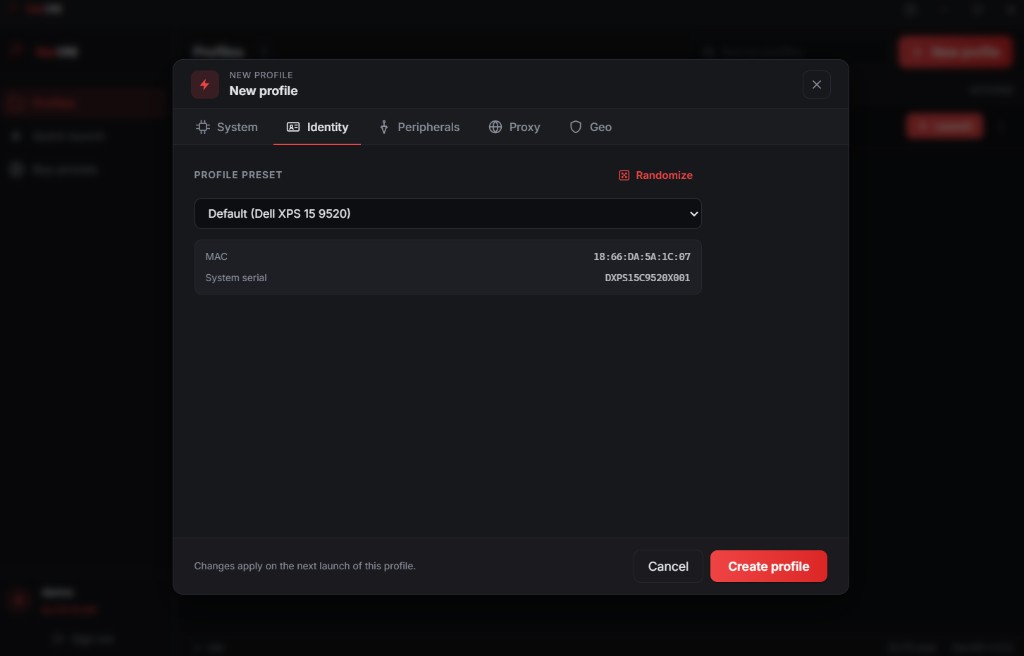
Direct identity control
Randomize a full preset or set every value by hand, right in the launcher.
Hardware-level spoofing
System UUID, SKU, board and chassis serials, BIOS revision, disk firmware, CPU brand string, ACPI and EDID all rewritten.
Operating-system identifiers
Machine SID, MachineGuid, Volume and Disk IDs, Device ID, Product ID, Store and Update client IDs regenerated on first boot.
Per-profile proxy and geo
Route each profile through its own HTTP or SOCKS5 proxy and auto-match timezone, locale and geolocation to the exit IP.
Real peripheral passthrough
Pass through a real camera, microphone, USB devices and even a GPU so the machine behaves like physical hardware.
Encrypted and isolated
On-disk encryption, isolated networking and full environment isolation. Nothing is ever stored in the cloud.
Every identifier we rewrite, in the open
Browser tools change a handful of values. VexVM controls 33 identifiers across all three layers, kept consistent so the machine never contradicts itself. Nothing hidden behind a tab.
Hardware identifiers
The deepest layer most tools never touch - read straight off the firmware.
- System UUID
- System SKU and product name
- Motherboard manufacturer and serial
- Chassis type, version and serial
- BIOS vendor, version and release date
- BIOS firmware revision
- Disk model, firmware revision and serial
- CPU brand string and core layout
- ACPI OEM and table identifiers
- Monitor EDID and serial
- MAC address
Operating-system identifiers
Rebuilt automatically on first boot, then the agent removes itself.
- Machine SID
- MachineGuid
- Disk GPT/MBR signature
- Volume serial ID
- Device ID
- User profile ID
- Computer name and workgroup
- Windows Update client ID
- Windows Store ID
- Windows Product ID
- Install date
Browser and fingerprint
The layer websites actually read - kept consistent with the machine below it.
- Screen resolution and device pixel ratio
- Installed font list
- Canvas fingerprint
- WebGL vendor and renderer
- AudioContext fingerprint
- WebRTC leak guard
- Timezone and locale
- Hardware concurrency and device memory
- Media devices enumeration
- User agent and client hints
- Platform and touch points
A control room for your identities
Launch in a click, or open a profile and shape every detail. Built to feel like a native Windows app.

Will it work for what you do?
The questions people ask before they buy, answered without the marketing fog.
Will it beat payment and checkout fraud checks?
Fraud systems score the whole device, not just the browser. VexVM gives each profile its own coherent hardware, OS and network identity, so there is no shared signature to score against.
Will ad and account systems link my profiles?
No. There is no shared canvas, WebGL, hardware serial or machine ID across profiles, so platforms cannot cluster them to one owner.
Can detection tools tell it is a VM?
The anti-VM hardening strips hypervisor flags, default device names and timing tells, so each machine presents as ordinary physical hardware.
What about proxies and IP leaks?
Each profile routes through its own proxy with timezone and locale matched to the exit IP, and the WebRTC and DNS leak guards keep your real IP from surfacing.
Will one ban take down everything?
No. Profiles are fully isolated, so a flag on one machine never cascades to the others.
Can I run it across more than one PC?
Studio activates on up to 2 of your own machines, with your profiles importable and exportable between them.
What you need to run it
Runs on ordinary Windows hardware. More RAM and cores let you launch more profiles at once.
Stop looking like the same machine
Spin up a clean computer for every account. Spoof everything, leave nothing, and run as many identities as your hardware allows.